
Cronzy Watch capability
Respond fast, with a second pair of eyes
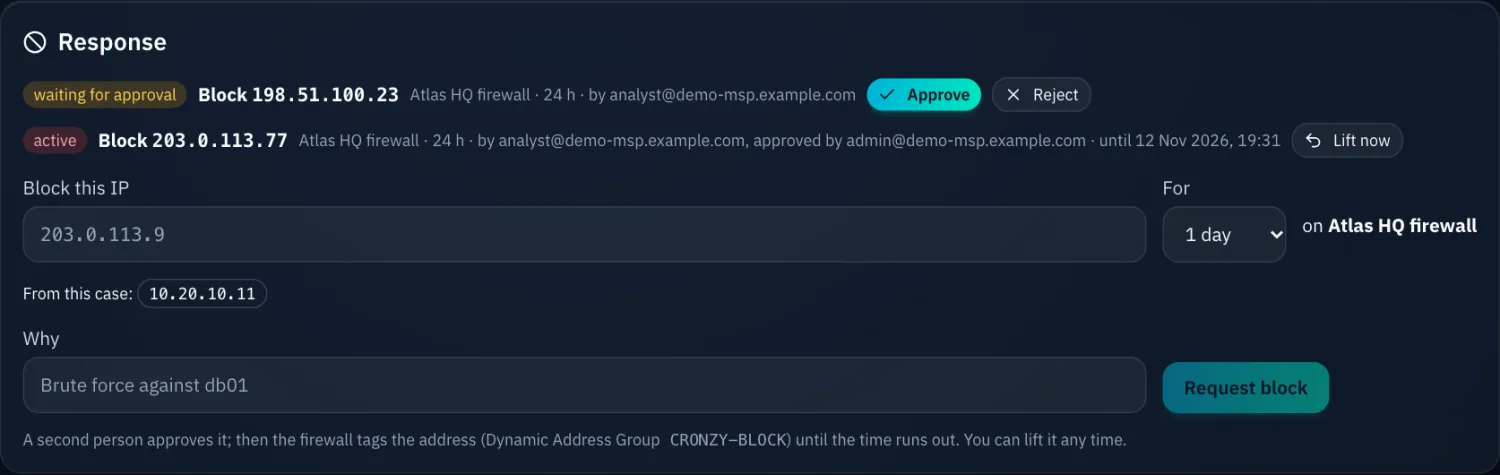
When you need to act now, Cronzy Watch can block an address on the firewall or, through Wazuh, isolate a host, block an address on it or stop a process. Nothing runs until a second person approves it.
What you get
Response with four-eyes approval, in practice
Four-eyes by design
One person requests the action and a different person approves it. The request and the approval are on the audit trail and noted on the case.
A short, defined list
The only write actions are blocking an address on the firewall, and host response through Wazuh: isolate, block an address on the host, stop a process.
Guardrails
Security infrastructure such as the Wazuh manager and your collectors can never be blocked or isolated by an action.
Timed actions undo themselves
An action can be given a duration, and it is undone when the time is up.
How it works
From connected to done
- An analyst requests the action from the case.
- A second person, with the right role, reviews and approves it.
- Cronzy sends it, and records who asked, who approved and the result it can see.
Questions
Frequently asked questions
Can one person approve their own request?
No. The requester and the approver are different people.
Does the host response confirm what the host did?
Cronzy confirms the agent received the command. The outcome is in the agent’s own log, so check it on the host.
Terms used on this page
Keep reading
Related capabilities
Attack correlation and cases
Scattered alerts become one case with severity, deadline and a timeline.
Palo Alto firewall security
Configuration checks, advisories, GlobalProtect and threat logs, turned into cases.
How to fix: remediation plans
A plan per CVE and the exact firewall commands for attacks, ready to paste.
See it on a demo estate
Tell us about your environment and we will show Cronzy Watch with data that matches it.