
MSP security platform · vulnerability management
Know what to fix first.
Cronzy Watch reads your estate from Wazuh, Palo Alto firewalls, AWS, Cisco and UniFi, ranks vulnerabilities by how likely they are to be exploited, turns attacks into cases, and shows you how to fix them.
The problem
Thousands of findings. Time to fix a few.
Scanners and agents produce long lists sorted by a generic severity score. Cronzy Watch puts one question first:what is actually being exploited, on which asset, and what do I do about it?
How it works
From connected to fixed in four steps
Connect, read-only
Add your Wazuh, firewalls, AWS and switches. Credentials are entered once in encrypted fields and are read-only by default.
Rank
Every asset gets a risk score from exploitation data, criticality and exposure. Vulnerabilities with no vendor fix are handled on their own line.
Correlate
Attacks and detections become cases with severity, deadline and timeline, with an e-mail when something is critical.
Fix
Follow the plan or paste the CLI. Mark the fix applied and Cronzy keeps watching until the case clears.
See it working
A tour of the product
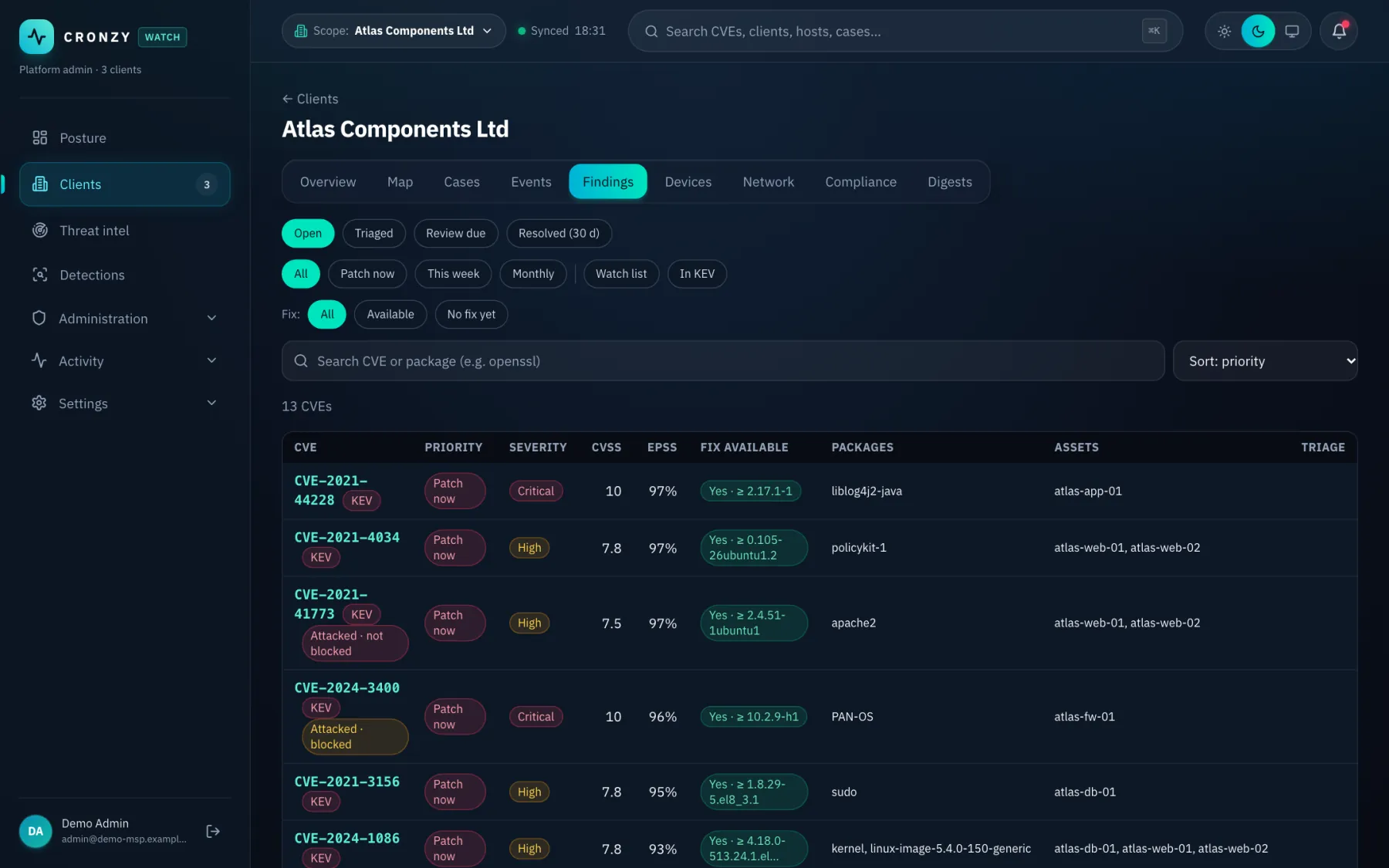
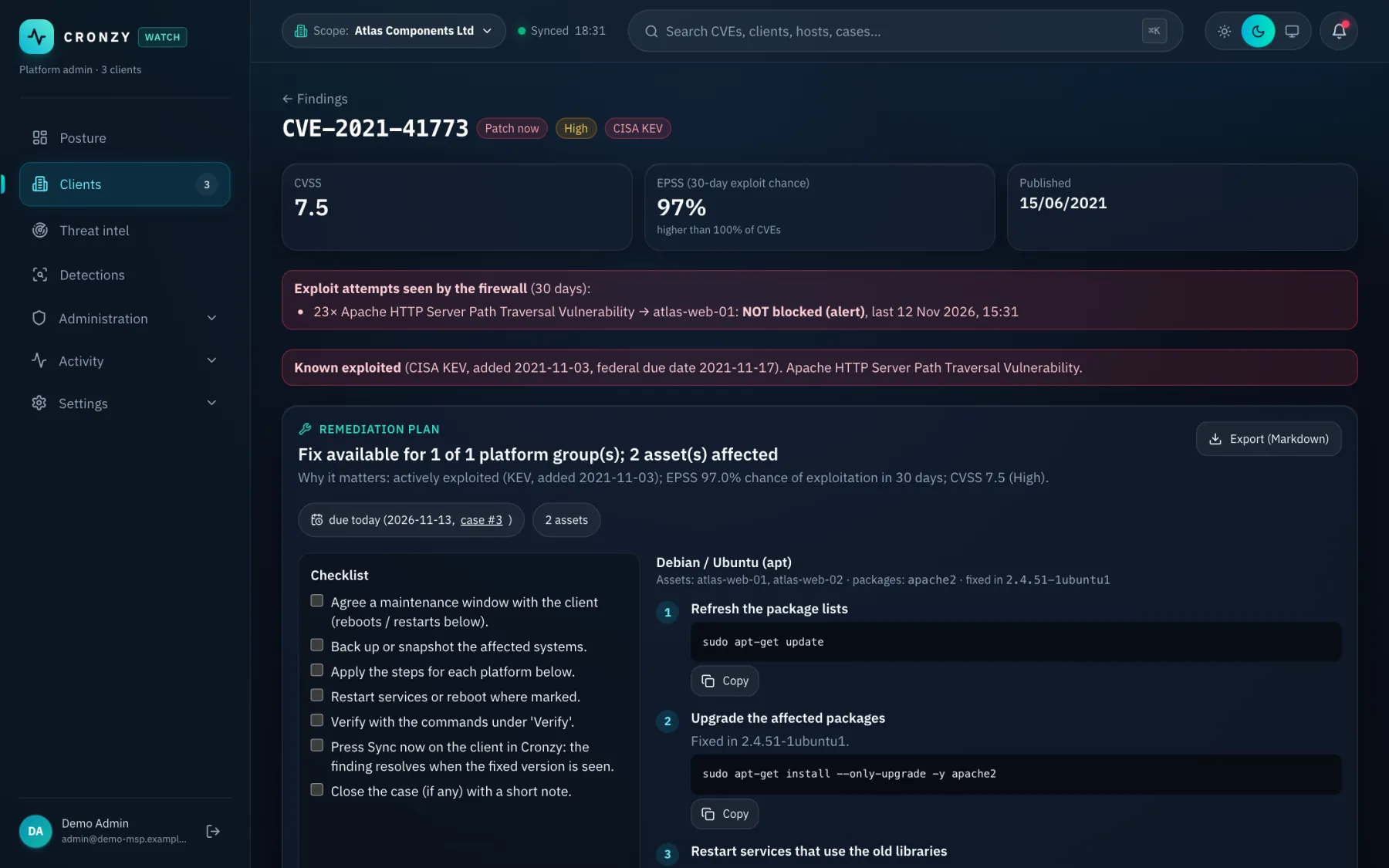
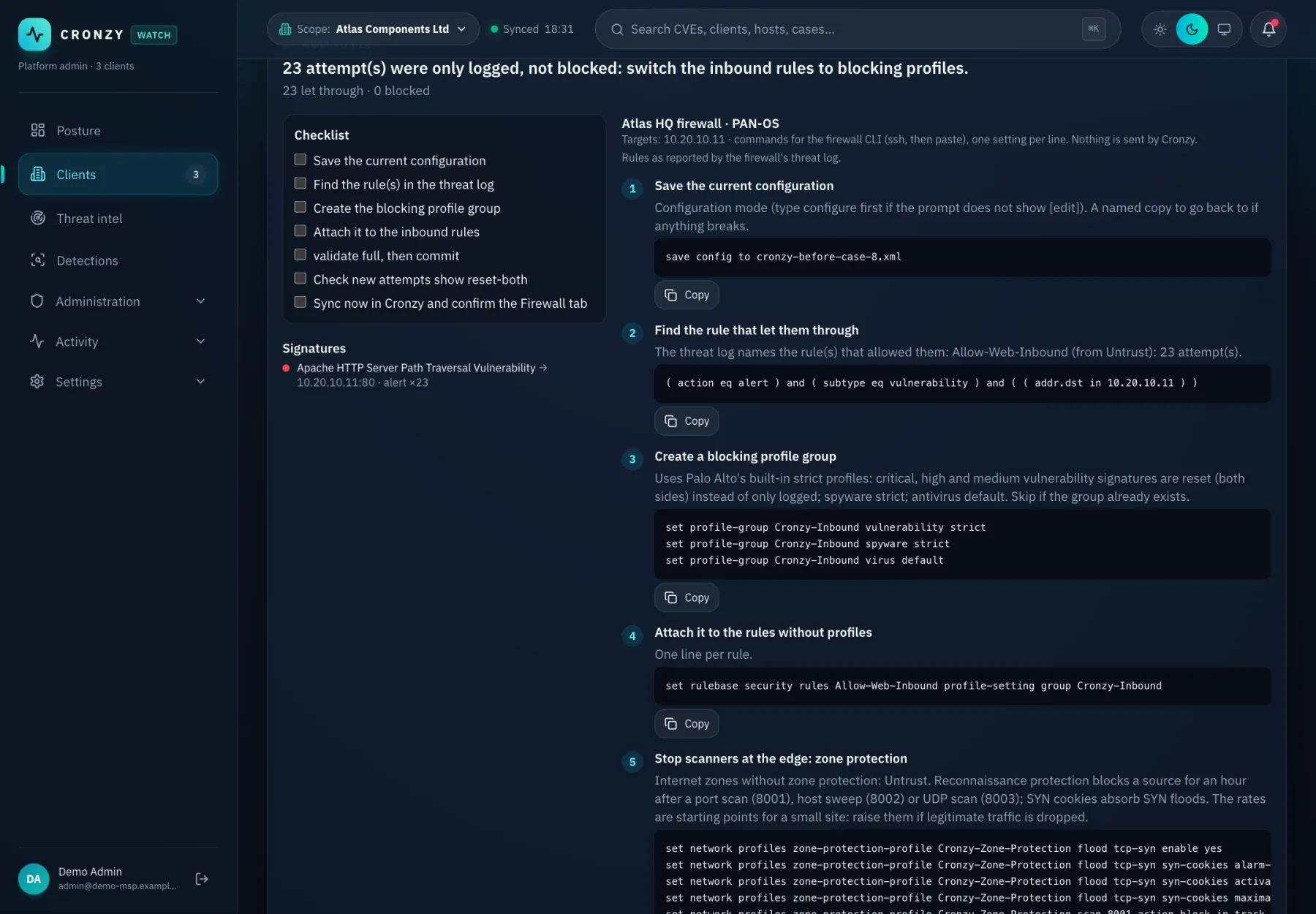
Screens from a demo environment with fictional clients and invented hosts. Click an image to enlarge it.

Capabilities
Explore what Cronzy Watch does
Vulnerability prioritisation
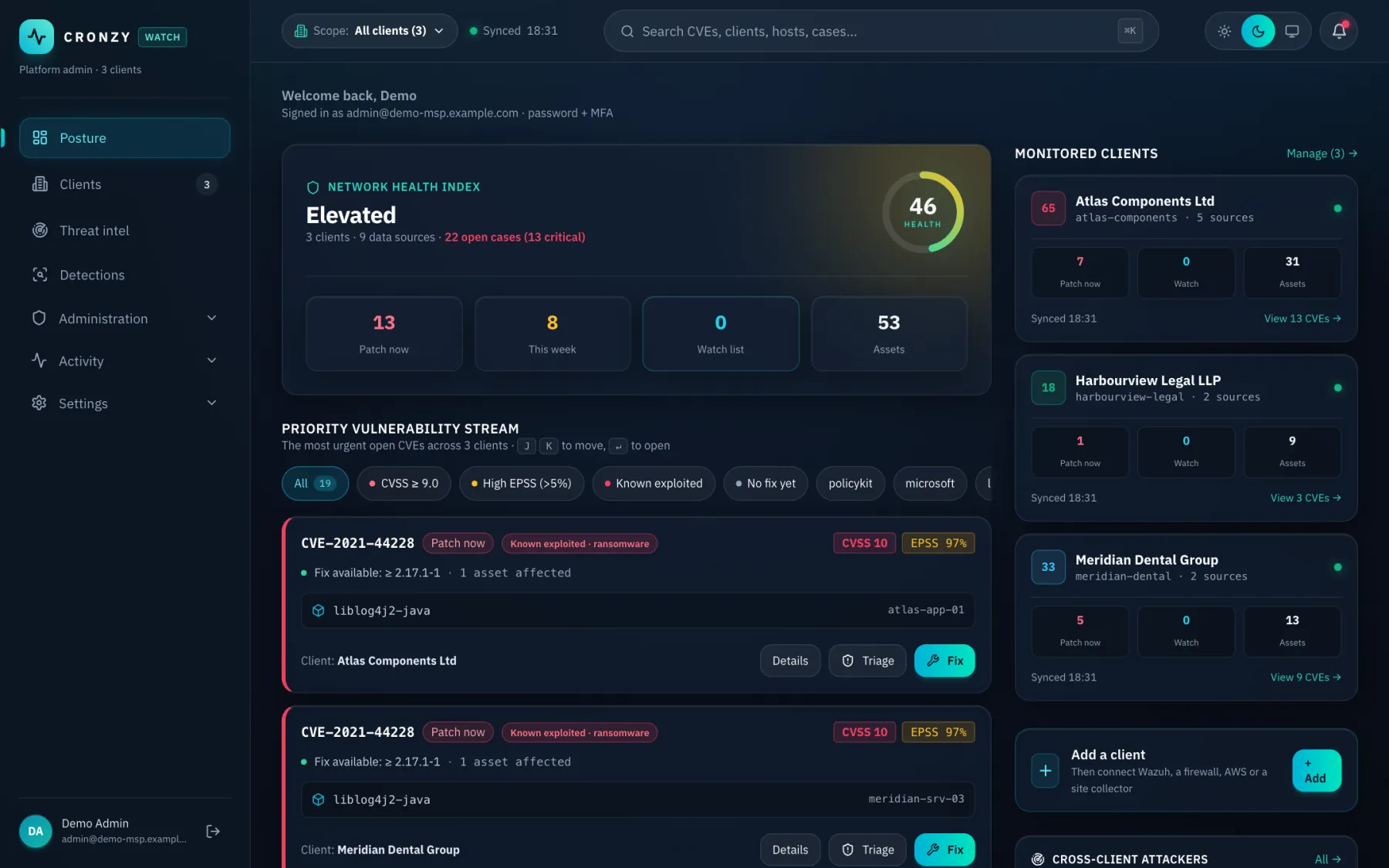
The list starts with what attackers actually use: CISA KEV and EPSS, not CVSS alone.
Attack correlation and cases
Scattered alerts become one case with severity, deadline and a timeline.
How to fix: remediation plans
A plan per CVE and the exact firewall commands for attacks, ready to paste.
Palo Alto firewall security
Configuration checks, advisories, GlobalProtect and threat logs, turned into cases.
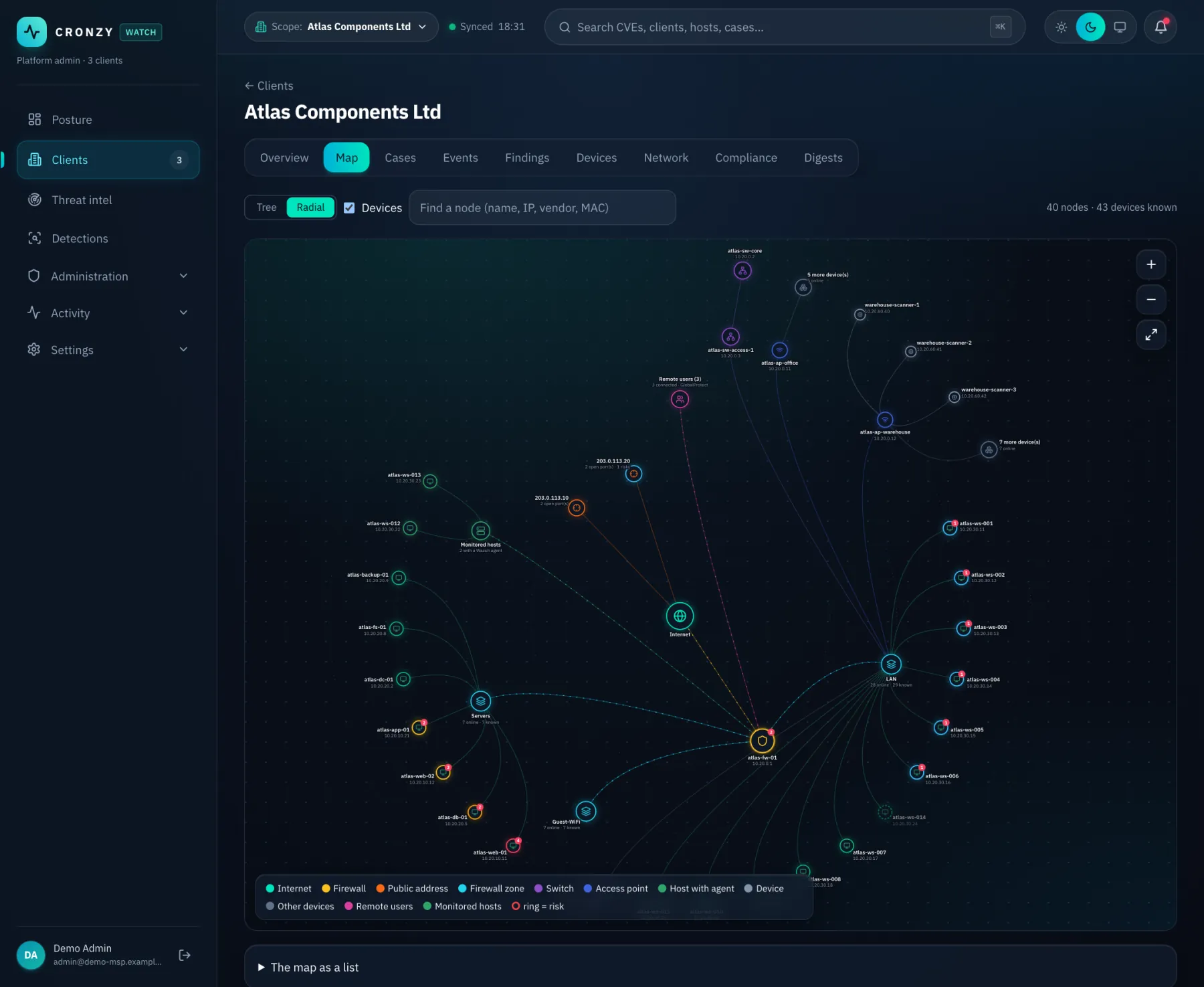
Network map
The network drawn from what the sources see, coloured by risk.
Compliance view (CIS, ISO 27001)
Your evidence mapped to CIS Controls v8 and ISO 27001 Annex A. A view, not a certification.
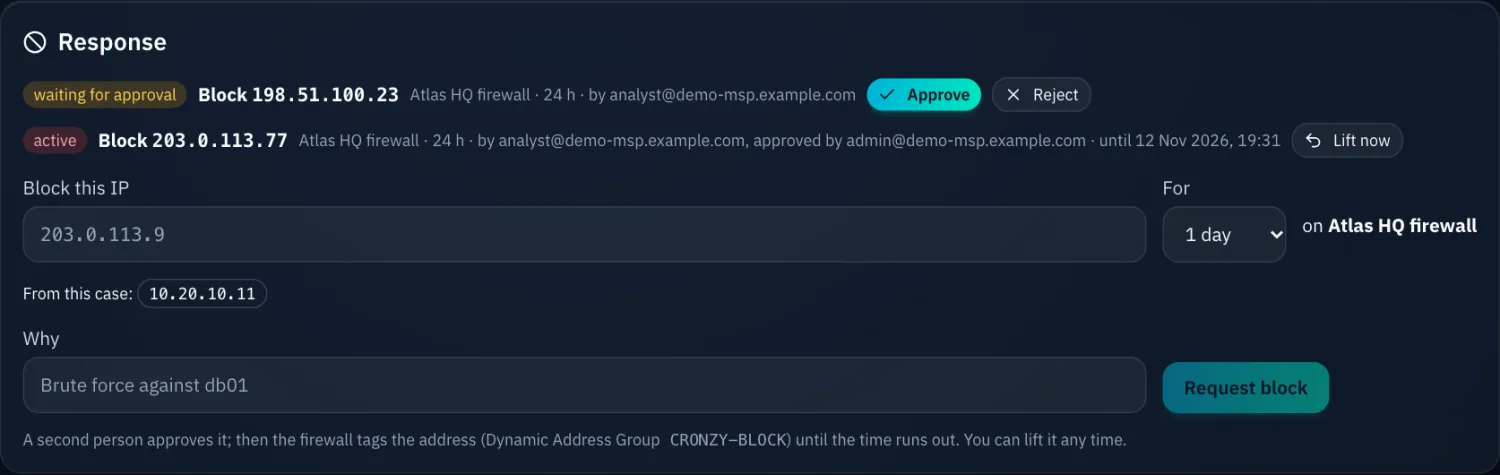
Response with four-eyes approval
Block an address or isolate a host. One person requests, another approves, all audited.
Internet exposure and discovery
What the Internet sees, and assets nobody told you about.
Built for MSPs and delivered as SaaS with an optional site collector. Read the guides, or look up a term in the glossary.
What it does
One view over your whole estate
Risk ranked by real exploitation
Every vulnerability is weighed with CISA KEV (known exploited) and EPSS (likelihood of exploitation), not CVSS alone, so the list starts with what attackers actually use.
Attacks correlated into cases
Scattered alerts become one case with severity, deadline and timeline. Scans weigh less than exploits, so the noise stays out of your queue.
How to fix, ready to paste
Each case and CVE comes with a remediation plan and, for firewalls, the exact CLI to apply. No searching vendor advisories at 2 a.m.
Firewall and network posture
Palo Alto configuration checks, advisories, GlobalProtect and threat-log intelligence, plus Cisco and UniFi switch inventory and a live network map.
Cloud coverage
AWS Inspector findings, organisation-wide coverage gaps and Security Hub, alongside your endpoints.
Internet exposure and discovery
See what the internet sees: exposed services, and assets nobody told you about, found through certificate transparency and DNS.
Detections you can read
A built-in pack of Sigma rules, plus import of your own. Detections feed the same cases as everything else.
Compliance view
Your findings mapped to CIS Controls v8 and ISO 27001 Annex A. A working view for your audits, not a certification.
Response with four-eyes approval
Block an address on the firewall, or isolate a host, block an address on it or kill a process through Wazuh. One person requests, another approves, everything is audited.
Built for MSPs
Many clients, strictly separated
Cronzy Watch is multi-client from the ground up, so one team can run security for many customers without mixing their data.
Row-level isolation
Each client's data is separated at the database level, not only in the interface.
Roles and sign-in
Role-based access with custom roles, MFA and single sign-on (OIDC), so technicians and client admins see what they should.
Audit and reporting
An audit log of who did what, and branded e-mail alerts and digests you can send on to your clients.
Deployment
SaaS first. A site collector when you need it.
Use Cronzy Watch as a hosted service. For networks that must not accept inbound connections, add a small collector on site.
Cronzy Watch SaaS
- Nothing to install or patch on your side
- Connect cloud and reachable sources directly
- Updates arrive without maintenance windows
With a site collector optional
- Runs at the client site and reaches devices on the inside network
- Outbound-only: it calls out to Cronzy, so no inbound firewall rule is needed
- Signed updates: the collector only installs releases signed by Cronzy
- Collects firewall, switch and Wazuh data that is not reachable from the internet
Security by design
A security tool you can trust with your estate
Read-only by default
Cronzy reads your systems. Response actions are limited to a short, defined list, and each one needs a second person to approve it.
Guardrails on actions
Security infrastructure, such as the Wazuh manager and your collectors, can never be blocked or isolated by an action. Timed actions undo themselves.
Credentials stay encrypted
Client credentials are entered in encrypted fields in the app and are never kept in code, chat or logs.
Questions
Frequently asked questions
Does Cronzy Watch work with Wazuh?
Yes. Cronzy reads agents, vulnerabilities and alerts from Wazuh, and can send a host-response command (isolate, block an address, kill a process) back through Wazuh after a second person approves it.
Is it built for MSPs with many clients?
Yes. Every client is kept strictly separate with row-level isolation, and access is controlled by roles, MFA and single sign-on. One dashboard covers all clients, and each client has its own view.
How does it prioritise vulnerabilities?
It weighs each CVE with CISA KEV (known to be exploited), EPSS (likelihood of exploitation) and what the firewall actually saw, not CVSS alone, so the list starts with what attackers use.
Does it support Palo Alto firewalls?
Yes. It checks the configuration, reads advisories, GlobalProtect and threat and traffic logs, turns exploit attempts that got through into cases, and shows the firewall CLI to fix them.
Is it SaaS, or do I install it?
SaaS first. For sites that cannot be reached from the internet, an optional site collector runs inside the network and only makes outbound connections.
Does Cronzy change anything on my systems?
It is read-only by default. The only write actions are a short defined list, such as blocking an address, and each needs a second person to approve it.
Get started
Request a demo
Tell us a little about your environment and we will get back to you, usually within one working day.